
I was digging through some old files and I found this sketch from 2003. I still like it. I should finish it sometime.
I was digging through some old files and I found this sketch from 2003. I still like it. I should finish it sometime.

I’d made a couple of little test fragments, but I felt it was time to do a real test image for The Drowning City.
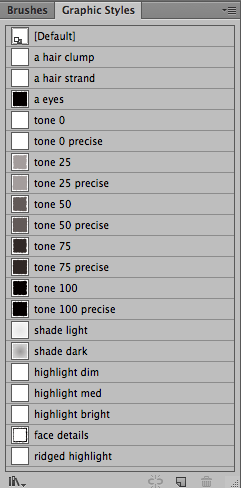
As I did this, I tried to codify what I was doing into a handful of styles. For Rita, I’d just do flat colors and the occasional brush, but this has a lot of settings going on – pretty much everything listed in this palette does the equivalent of poking at three or four other palettes to choose a color, maybe a gradient, maybe an art brush, and add some effects to it. Much easier to just do it once and save it.
As I work on the comic, this will probably expand – I’ll have a few styles for various bits of each character, maybe stick some details into art brushes like I did on Rita, and in general use a lot of Illustrator tricks to let me do complex imagery without much work.
(Come to think of it, doing a couple more drawings of some of the other main characters might be a good way to refine this toolkit, and add more bits I may need.)
Edit. Worked on the styles for a little longer; took out a lot of use of ‘roughen’, gave the shading styles a bit of an extra halo, and refined the art brushes. It is still messy and organic but it was a little too messy before.

Man, I love Illustrator.
This gif is cycling between the full preview render and the outline view of a tiny handful of paths, with some magic applied. It’s based on this method of creating grass, but substitutes a little triangular symbol for the generic line, and drops the ‘roughen’ effect.
It looks astoundingly close to the grass I’ve been drawing for the past few years via individual strokes with a triangular art brush, but takes a tiny fraction of the time to make happen – at this point, I have definitely spent more time documenting this than it took me to draw this grassy hill, once I had the appearance stack tweaked to my liking. And if I wanted it to be Just Right, I could easily go back and add a few more pieces of grass by hand to fix a few awkward edges.
If you want to play with my version yourself, here’s the appearance stack and effect settings. Make two green colors and switch freely between them while drawing some overlapping shapes, stick a shape behind them with just a basic solid fill, and bingo. Grassy terrain.


Fucking around with some brushes. The two sets of strokes on the right are the exact same bristle brush, except with some Appearance panel trickery applied to the right-hand copy.
Most of the solid shapes are just pencil-tool drawn shapes with a fill and no stroke, and with Roughen applied in the Appearance panel. I think I probably need to put some kind of art brush on these things for the look I really want for ‘Drowning City’.


And if you want to try this yourself, here are the settings for the bristle brush and appearance stack I’m using. The top ‘roughen’ is 12pt absolute, 10/in, smooth points; the bottom one is 2 pt absolute, 46/in, smooth points.
Also I feel like this Alecto is really off-model; her design has varied over the years so it’s hard to know which one is exactly Right offhand without digging in my favorite sketches of her.
Ultimately, my goal is for Drowning City to be done with a ton of brushes and effects that take a lot of the work out of it for me; I’d like to be able to knock out a panel without spending much more time than I do on Rita, but have it look all painterly. I will have to work out some processes that make this easy. Obviously I’ll have to put SOME more effort in, as I want everything to tend to have some shading; Rita has strong shading sometimes, but a lot of panels are completely lacking in any sense of light or shade. But I think I can come up with some rules for how to shade everything that will make it fast.
(This drawing uses various tints of one color, and simply shades things by using a dark color at 20%; some experimentation suggests that a couple of messy thick brush strokes of that dark color at 20% works pretty well for a ‘painterly’ shading look! But also reveals that reverting from 18.1.1 to 18.0 leaves it super unstable when dealing with any kind of interesting appearance tricks, sigh.)
(Also of course doing the ‘noisy paper’ technique I did in Absinthe will add a lot to that “painterly” look.)

It’s official. I’m old. I just gave art advice to someone who was born the same year I started using Illustrator as my main medium. I have a pencil case that’s older than this kid that I still use.
(For the record? I got a CD full of pirated copies of Photoshop, AI, and Painter from a friend, then grabbed ‘Real World Illustrator 8’ and started fiddling around. I also told this kid to not focus exclusively on learning Illustrator, but also to spend time sitting around with pencil and paper drawing stuff.)

I was planning on just sewing a bunch of LEDs into my black coat and going as a Blinky Witch, but I think I just came up with a much more beautifully stupid idea. All I need is a few layers of red lingerie, black goggles or wraparound mirrorshades, an emblem sewn to the uppermost layer, a black beanie, and a black balloon full of helium!
Bonus points: persuade someone to dress up as John DiFool, and make a Deepo by attaching some stuff to a white balloon.
Nobody will get this. Except for that one person who is quite possibly a NEW BEST FRIEND.
I’m really tempted to do this. And still keep on sewing LEDs into my coat, of course, because, hey, who doesn’t want to high-tech multicolor witch coat?

Another one of the Female Furies.
For Lashina, I felt I had a tight edge to walk – I wanted to keep what is, quite honestly, the BDSM flavor of her outfit, but de-objectify it a bit. Those rings around the tits were cute, Jack, but kinda blatant. I took it down to one simple signifier: she’s got a collar with a ring on it. Also she whips people with the steel ribbons she’s tied up in but that’s nothing new.
 Big Barda: looks like Lanie Kazan, acts like Roz Kirby. And kicks all the ass. As with my previous redesign of Orion, I tried to take Jack Kirby’s original design and strip it down to an essential. Barda’s fish-scaled armor has turned into hex-scaled armor, and the hexagon theme of her belt in some of Jack’s drawings has been extended to the red bands on her limbs. The panties-over-leggings look is gone because the ‘circus strong man’ resonance it conjured up in the fifties is long since gone for modern people like me.
The floating bits on her powered-up Power Rod are held there by gravity manipulation, and can be extended very rapidly. Not that she needs it to kick your ass. But it comes in handy when she’s beating apocalypse-sized gods down to size.

Table commission from Rainfurrest 2014. Goldkin builds tooling for VR, and wanted a Rita-style piece.
Hooray for scale brushes I got off the internet.
I was sitting around answering questions in the Illustrator subreddit when I found a link to a neat tutorial on faking toothbrush splatters in Illustrator.
So I tried it out.

I added a wrinkle to it that the tutorial didn’t bother with; instead of having a lot of duplicated shapes with grained-up gradients over flat fills, I just added a new fill to my shapes with the Appearance palette, then gave them various linear and radial fills that I added the grain filter to and set to multiply mode. Less shapes are better, in my mind, because it’s a ton easier to go in and tweak things for just the right curve.
(You could also just draw the grainy gradients inside the shapes, which upon reflection would probably be a bit faster, but I dunno, I just like the technical sweetness of the Appearance palette sometimes.)
I’m pretty happy with how this turned out for a 15-minute doodle. I may have to do a more involved piece using this effect sometime in the future.
Here’s the AI source if you want to poke around.
(If you’ve read Rita, please do not try to read any significance into my color choices – this is just me picking random colors that felt fun together.)