self abuse?

Yesterday I walked to pole class and walked back.

Today I blew off yoga, took the bus to pole class, and walked back.

This is because last week I scheduled myself for class two nights in a row on a whim. I'm not sure whether I should thank Past Peggy or curse her. Ill decide when I see how much I ache tomorrow morning.

Either way I don't think I'm scheduling like this any time soon again. Not until I stop having lurid bruises the day after class.

noticing habits

Well that’s interesting. Moving my dock to accommodate Illustrator’s font menu revealed an interesting behavior pattern: I flick my mouse into the dock to see if I have any new email a lot.

This is really not a productive behavior for someone who pretty much works alone. Turning off the “new mail” badge and reprogramming myself to only check mail like a couple times a day, immediately.

Illustrator CC 2014

New version. Hooray?

Screen Shot 2014 06 19 at 12 44 15PM
It installed next to the old version. This is getting kinda ridiculous. Admittedly I’m making it a little worse by keeping CS6 around, I keep hemming and hawing about reverting to it because of the way the pencil tool changed in CC and never quite decide to do it.

It offered to sync my prefs from the last version and completely failed to do anything. After I manually copied a ton of stuff over, I realized that while the “sync settings” switch had been turned on in the old version, it said it had never actually been synced. Am I crazy for thinking that it should have done this at least once somewhere in the past? Well, after I got everything set up on the new one I hit that obscure little sync button a few times, we’ll see what happens when Illustrator 19 comes out.
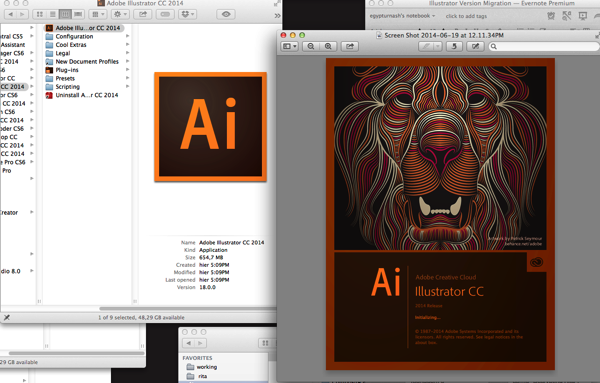
Screen Shot 2014 06 19 at 12 12 08PMScreengrab of the bitchin’ new startup screen next to the shitty boring periodic table icon Adobe’s been using ever since the “Creative Suite” rebranding.

Screen Shot 2014 06 19 at 12 36 52PM

Yeah. That’s much better. Looks a little derpy at this size but with a tiny bit of tweaking, and removing the dim gradient over it, this could be a TOTALLY RAD icon. I’ve been lovingly copying that Venus icon from the last pre-CS Illustrator since 2003; I would be completely happy with saying goodbye to her if she was replaced by a succession of stylistic riffs on A FUCKING LION ROARING FROM MY DOCK 24-7. Adobe please fire all your branding people and get on this immediately.

(I’m also glad to see an actual IMAGE on the startup screen again, it’s all been a bunch of abstract stuff across the whole line ever since the CS rebrand.)

Screen Shot 2014 06 19 at 12 54 14PM
It took like three quit and restarts before CC2014 would remember my choice to stop showing me this at startup. I guess it’d be pretty nice if you’re new to Illustrator. It basically leads to a bunch of video tutorials which is a mode of instruction I basically hate so whatever, I’ve also been using Illustrator for fourteen years now so I’m pretty sure I’m not the target market for this. Honestly though I don’t think a company Adobe’s size has any excuse for not providing this stuff in text too.

Pencil tool is still super-aggressive about closing the paths I draw, with no options to control this, ugh. This will continue to annoy me when doing both my roughs and finals.

There still isn’t a tool that lets me draw variable-width strokes that vary with the pen pressure. It’d be nice if Adobe would actually finish that feature someday. Still doesn’t work on scatter brushes or calligraphic brushes either.

Oh hey I just realized that the brush tool hasn’t had the path-closing feature added. Hmmm. Nah, that’s not gonna replace my sketching workflow; it creates just enough lag to drive me nuts, and makes me want to make a “nice” drawing at a time when that’s the last thing I want to do.

Ugh why is “new art has basic appearance” on again ffffff. Adding that to my list of Stuff To Frob In A New Version.

Gritting my teeth and going through the “what’s new” section expecting to suffer a ton of video tutorials with people sllloooowwwwllllyyyy eeeexxxxpppppllllaaaiiiinnnniiinnnnggggg ttttthhhheeeeee nnnnneeeeewwwww fffeeeaaaattttuuuurrrreeeesssss.

Oh good, it now doesn’t show a corner curving handle for every single shape when you have a lot of stuff selected. That feature may actually be usable now. It seems like it triggers based on some certain percentage of corners in the shapes you select? If I draw a bunch of angular stuff with the pen tool then it won’t go away, but if I select those and a bunch of sketchy curvy stuff it does. Checking in the last version shows that it now works this way, I guess they tweaked it in the 17.1 update after I’d recoiled in horror and turned it off. So I guess I may be marginally glad it didn’t sync my prefs. Maybe. A little.

ugh god I don’t wanna listen to this guy with a weird accent tell me about the new features of the pen tool. why does the help function in illustrator never fucking work for me any more, it always just tells me I have to connect to the Internet. Which I am. And I’m not blocking anything in the hosts file either. What is wrong with you Adobe.

Okay I found a text version of the WHAT’S NEW stuff. YAY.

Liking the rubber band pen tool preview and loving the drag unequal anchor points. Not sure I’ll use the “convert corner handle to curve handle” much, we’ll see. And HOORAY they FINALLY made holding down space to move an anchor point around while closing a path work properly instead of having it flicker all around insanely, this is something that’s been happening since the very first time I used Illustrator.

There is some new shit for Typekit whatever. Font menu is still the giant ugly piece of ass it’s been since CC, when they moved from a nice simple system dropdown with the font name written in it to a giant homebrew menu that jams up against the right side of the screen and interferes with me keeping the dock there. I dunno, maybe I’ll try moving the dock to the bottom or the left side, since Illustrator’s clearly not changing their side of this battle any more.

They “listened” to people’s complaints about the CC pencil tool and added a checkbox to revert some of the new behavior but did not fix the aggressive path-closing behavior that drives me bugfuck, oh well. I’ve sort of adjusted to it but it still gets in my way.And there’s a similar “it wasn’t ever broken” checkbox for the new “path segment reshape” behavior from CC, which doesn’t bug me as I really never reshape stuff that way anyway. I may start doing it more, I like the new version better.

Also they seem to have quietly fixed that bug I found where actions involving the Pathfinder palette lost certain important nuances of what you actually did after reloading the action, so yay! I have f1-f3 for non-destructive Pathfinder operations again!

Guess it’s time for some bug reports/feature requests…

Illustrator script: Blend color swatches.

My first love in digital art was Deluxe Paint, way back in the late 80s and early 90s. The way it exposed the Amiga’s color model really shaped a lot of the way I still work; being able to tweak a “global” color swatch in Illustrator and have everything I drew in that swatch immediately change, the same way tweaking a palette register in DPaint worked, was the deciding factor in me choosing Illustrator over Painter or Photoshop when I switched to a Mac.

Lately I’ve been experimenting with returning to these roots in the way I manage my colors. A common workflow in DPaint was to pick a couple of colors at widely-spread points on the palette, then make DPaint fill in all the intervening palette registers with a smooth gradient between them. I’ve been simulating this workflow by making a couple of global swatches, then drawing a couple of boxes, using Illustrator’s blend tool to generate a series of shapes that have a color gradient, and eyedroppering all of those colors into the palette, then setting them to global swatches. But obviously that is a lot more steps than “select two colors, hit a button”. So I spent an hour and a half doing some scripting…

As the video notes, it only works on global CMYK swatches. If you work in RGB or spot swatches, you’ll have to tweak this some.

Download Blend Swatches.jsx and stick it in the presets/your_language/scripts directory, then invoke it with file->scripts, and enjoy. (You’ll have to quit and relaunch AI if it’s running before the script shows up in that menu.)

thinkin’ about ads and printing and stuff

I got some email from Project Wonderful this morning telling me that my funds were about to run out. I was surprised – I had campaigns running? And it turns out I did; I’d run a broad campaign, then threw some money at the two top performers in terms of actual engagement, and forgotten about them. For about two months.

Bumbling around Google Analytics suggests that I have pretty much gotten all the archive bingers I’m going to get out of Sinfest and Grrl Power, so I guess it’s time to do a new broad campaign to figure out where to go next. I might put a bit more in and have a higher maximum bid this time; we’ll see how I feel after I go wire a couple thousand bucks to China to pay for printing.

Which is my agenda for today. I was intending to do it over the phone, after an unsuccessful trip out to the BECU by University Village yesterday, but I just looked at my figure in the mirror and there’s a distinct improvement from a couple days ago, so I may well just get my ass moving and walk out there again.

(See, last November, some new federal regulations came down to require a half-hour period of takebacks on international money transfers, due to a rise in scams. Part of these regulations mean that you can’t initiate one after 1pm – at least after 1pm on the West Coast, I dunno if it’s 1pm in Your Timezone or 1pm Pacific/4pm Eastern – and you can’t even do all the paperwork for it and have it fire off tomorrow morning. Fucking scammers.)

Also to be honest I really find that doing business over the phone is in an awkward middle ground. I’d rather do stuff either in email or face-to-face if possible. So what the hell, I’m gonna get some serious walking in today…

I would like to run some ads on Girl Genius; I figure a quote from Phil Foglio would go over pretty well with the rabid fans of his comic. But sadly they have switched from Project Wonderful ads to Hiveworks ads, and HW involves actually dealing with a human who has five zillion other things on his mind instead of just poking at an endlessly-ready program.

edit. Oh hey I forgot to actually post this. It was still sitting there in MarsEdit when I opened the machine up at the bank to give them the crucial details. Then I walked back to the U and had a tasty, protein-heavy breakfast at Portage Bay – I’ve got pole class tonight, I’ll be turning that pretty much entirely into muscle I think.

Aaaand I just dropped $200 into PW, and bumped the amount I was willing to let it spend per day on my ‘comics with more than 10k daily views’ from $20 to $40. So we’ll see what happens there.

Piranha

Piranha


Piranha from “Jet Set Radio”. Guess who I pretty much always played once I’d unlocked her?

This is a simplified version of her look from the first game, with a tiny bit of her costume in the second.

Edit: Oh yeah. I keep kinda wanting to cosplay as her but keep on being concerned that (a) race issues make it Problematic and (b) white just doesn’t look too good on my pale pasty flesh. Maybe some black edging for contrast would fix the latter.

the very private dream

I think one of my dreams this morning made me sign an NDA before I could wake up.

pondering my next moves

Hmm. I’m starting to wonder if it’s time to spend a few days doing rough layouts and dialogue for the entire rest of Rita. I’m getting close to the end; I have a synopsis of the next eight chapters, which will take up about 48 pages total if I hew to about 64 pages per volume. Which I would really like to do.

I’m about done with the last page of the current chapter, and don’t have any more roughs to work up – I typically do them in groups of 3-5 pages. This would be a sustained effort that would make the next page take longer, but it might be worth it in how it’d make a lot of the rest of the work simpler, in a way. Plus I’d be able to start sllloooowowwwly filling in a couple of really insane pages planned for near the end of the book. And maybe try to nail the page count down to exactly the right size.

On the other hand… I just counted my estimated page counts for the rest of the story and am doing pretty good – I’m estimating 50 pages, plus the 18 pages I’ve done so far on book 3. Only 4p over target, not bad. Book 1 was 56p of story, 2 was 58p – add in about 8p of front and backmatter and volume 3 will clock in at about 76p all told. Which I think is a hell of a lot better than “the last book is twice the size of the rest combined”. If I find any fat to cut, I’ll do it, but this story’s already pretty lean.


Dug out my sketchbook roughs for the last volume, changed a lot of chapter numbers to match with the “BOOK 3 HAZ A CHAPTER ORDER” note in Evernote. Drawin’ time, for at least the next chapter or two, if not the whole story.

Hard Bargain

Hard Bargain
Hard Bargain

Oh hey here’s a commission I took last year at Anthrocon.

After drawing that fake crack screen, I still had the kinds of palettes I used back on the Amiga on my mind. Which were pretty similar to the color schemes the Nosepilot guy used. I did a card for Furoticon today in that sort of space, then decided to knock off another thing that was Not Rita by doing this as well.

Basically the method is this:

1. Pick 3-4 colors. They should have different values.

2. Blend between them. Three spaces in between is about right.

3. Eyedropper those middle colors into new global swatches.

4. Draw lots of shapes under my rough, in the same way I draw stuff for Rita. Try to keep each object pretty much in one color ramp, aside from the occasional accent.

No gradients, no blend modes, just solid shapes in a thoughtful palette. Pretty simple, and a nice place between “really colorful” and “takes forever to draw”. I may have to try doing some more stuff like this for a while; I feel like I’ve been bouncing between the super-abstracted colors of Rita and a way-too-modeled place for too long.

Ultimately, I’m just coming back to a way of coloring I was seeing all the time when I watched demos on the Amiga. I’m back where I began, except a few levels higher; progress is as much a spiral as a straight climb.

I AM THE LAW

dredd

Judge Dredd. Inspired by this article on Dredd’s uniform.