Getting complicated images with spot colors out of Illustrator is not exactly an intuitive process. For the Tarot and book 1 of Rita, I ended up separating the spot gloss manually, and generating two TIFFs for every page that had gloss on it.
This was a royal pain in the ass, and I’d like to never have to do it again. So I’ve been investigating some stuff, and I think I found an answer.
1. Open InDesign.
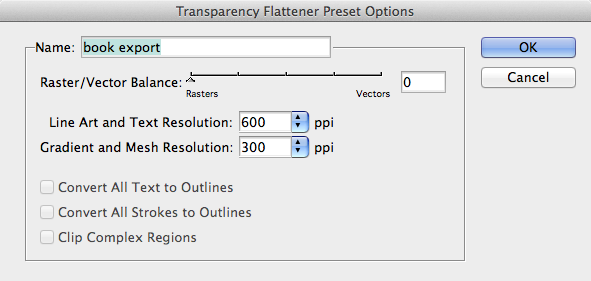
2. edit->transparency flattener options, create a new preset. Set the raster/vector balance to 0 – entirely raster; set the two resolutions to whatever you want. Indesign will warn you this can result in large files; you’re fine with this.
3. Place an AI file with spot colors.
4. Draw a white rectangle in front of it.
5. window->effects, set the white rectangle’s transparency to 100% multiply.
6. Export a PDF. You want it to be compatible with acrobat 4. In the ‘advanced’ section, choose your transparency flattener preset.
Load the resulting PDF into Illustrator and play about with the separations palette. Bingo: bitmaps with the spot colors as their own inks. You may notice a grid of white lines over everything; this is an artifact of Illustrator’s preview rendering, and will go away if you turn off anti-aliasing in the first page of AI’s prefs.
Adjust your template .indd file similarly, do your data merge, and voilà – your book is ready to go to print.
(Making the template file is another blog post entirely. Short version: The ‘data merge’ palette is YOUR BEST FRIEND.)
I haven’t tested this all the way through to the end yet, but test prints on my inkjet are sure looking promising.
Basically what we are doing is this: InDesign doesn’t let you mark objects to be rasterized, but if you export to an old version of the PDF format that doesn’t support transparency, it will rasterize everything involved in a transparent overlay. The “multiply by white” transparency is a null operation, visually – but InDesign doesn’t know this, and diligently rasterizes the entire page.
In an ideal world I’d just be handing a humungous file full of vectors to the printer, but in practice their machines will choke on my very complicated files.