New version. Hooray?

It installed next to the old version. This is getting kinda ridiculous. Admittedly I’m making it a little worse by keeping CS6 around, I keep hemming and hawing about reverting to it because of the way the pencil tool changed in CC and never quite decide to do it.
It offered to sync my prefs from the last version and completely failed to do anything. After I manually copied a ton of stuff over, I realized that while the “sync settings” switch had been turned on in the old version, it said it had never actually been synced. Am I crazy for thinking that it should have done this at least once somewhere in the past? Well, after I got everything set up on the new one I hit that obscure little sync button a few times, we’ll see what happens when Illustrator 19 comes out.
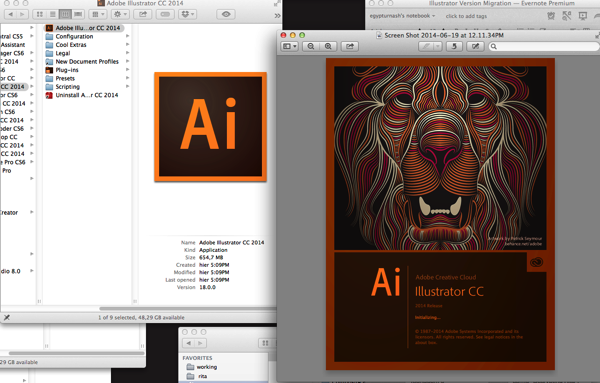 Screengrab of the bitchin’ new startup screen next to the shitty boring periodic table icon Adobe’s been using ever since the “Creative Suite” rebranding.

Yeah. That’s much better. Looks a little derpy at this size but with a tiny bit of tweaking, and removing the dim gradient over it, this could be a TOTALLY RAD icon. I’ve been lovingly copying that Venus icon from the last pre-CS Illustrator since 2003; I would be completely happy with saying goodbye to her if she was replaced by a succession of stylistic riffs on A FUCKING LION ROARING FROM MY DOCK 24-7. Adobe please fire all your branding people and get on this immediately.
(I’m also glad to see an actual IMAGE on the startup screen again, it’s all been a bunch of abstract stuff across the whole line ever since the CS rebrand.)

It took like three quit and restarts before CC2014 would remember my choice to stop showing me this at startup. I guess it’d be pretty nice if you’re new to Illustrator. It basically leads to a bunch of video tutorials which is a mode of instruction I basically hate so whatever, I’ve also been using Illustrator for fourteen years now so I’m pretty sure I’m not the target market for this. Honestly though I don’t think a company Adobe’s size has any excuse for not providing this stuff in text too.
Pencil tool is still super-aggressive about closing the paths I draw, with no options to control this, ugh. This will continue to annoy me when doing both my roughs and finals.
There still isn’t a tool that lets me draw variable-width strokes that vary with the pen pressure. It’d be nice if Adobe would actually finish that feature someday. Still doesn’t work on scatter brushes or calligraphic brushes either.
Oh hey I just realized that the brush tool hasn’t had the path-closing feature added. Hmmm. Nah, that’s not gonna replace my sketching workflow; it creates just enough lag to drive me nuts, and makes me want to make a “nice” drawing at a time when that’s the last thing I want to do.
Ugh why is “new art has basic appearance” on again ffffff. Adding that to my list of Stuff To Frob In A New Version.
Gritting my teeth and going through the “what’s new” section expecting to suffer a ton of video tutorials with people sllloooowwwwllllyyyy eeeexxxxpppppllllaaaiiiinnnniiinnnnggggg ttttthhhheeeeee nnnnneeeeewwwww fffeeeaaaattttuuuurrrreeeesssss.
Oh good, it now doesn’t show a corner curving handle for every single shape when you have a lot of stuff selected. That feature may actually be usable now. It seems like it triggers based on some certain percentage of corners in the shapes you select? If I draw a bunch of angular stuff with the pen tool then it won’t go away, but if I select those and a bunch of sketchy curvy stuff it does. Checking in the last version shows that it now works this way, I guess they tweaked it in the 17.1 update after I’d recoiled in horror and turned it off. So I guess I may be marginally glad it didn’t sync my prefs. Maybe. A little.
ugh god I don’t wanna listen to this guy with a weird accent tell me about the new features of the pen tool. why does the help function in illustrator never fucking work for me any more, it always just tells me I have to connect to the Internet. Which I am. And I’m not blocking anything in the hosts file either. What is wrong with you Adobe.
Okay I found a text version of the WHAT’S NEW stuff. YAY.
Liking the rubber band pen tool preview and loving the drag unequal anchor points. Not sure I’ll use the “convert corner handle to curve handle” much, we’ll see. And HOORAY they FINALLY made holding down space to move an anchor point around while closing a path work properly instead of having it flicker all around insanely, this is something that’s been happening since the very first time I used Illustrator.
There is some new shit for Typekit whatever. Font menu is still the giant ugly piece of ass it’s been since CC, when they moved from a nice simple system dropdown with the font name written in it to a giant homebrew menu that jams up against the right side of the screen and interferes with me keeping the dock there. I dunno, maybe I’ll try moving the dock to the bottom or the left side, since Illustrator’s clearly not changing their side of this battle any more.
They “listened” to people’s complaints about the CC pencil tool and added a checkbox to revert some of the new behavior but did not fix the aggressive path-closing behavior that drives me bugfuck, oh well. I’ve sort of adjusted to it but it still gets in my way.And there’s a similar “it wasn’t ever broken” checkbox for the new “path segment reshape” behavior from CC, which doesn’t bug me as I really never reshape stuff that way anyway. I may start doing it more, I like the new version better.
Also they seem to have quietly fixed that bug I found where actions involving the Pathfinder palette lost certain important nuances of what you actually did after reloading the action, so yay! I have f1-f3 for non-destructive Pathfinder operations again!
Guess it’s time for some bug reports/feature requests…
For what it’s worth, I checked on Adobe’s forums and apparently settings sync isn’t working for anyone. I’ve copied over my settings, but still need to copy over plugins and extensions.
My biggest question, though, is why Adobe felt the need to dump a brand new version on us, and not offer the ability to do an in-place upgrade? I could just about understand it with the move from CS6 to CC last year, since there were some pretty major changes under-the-hood. But CC 2014 is (as far as I can tell) about 6 months of bug-fixes + new features and a repaint job compared to the version of CC that I currently have installed.
I’m not that bothered about the icon for Illustrator – just as long as the blasted thing doesn’t crash on me!
Yeah, the “doesn’t overwrite CC” is weird. I guess it’s because this has a new version number – CS6 was 16.0.0, CC was 17.0.0, and this is 18.0.0. Really hoping they get the stupid version migration thing fixed by 19.
The icon is a long-standing thing. I started using Illustrator pretty much exclusively back during the Venus branding, and like most people who got into Adobe’s stuff in the pre-CS days, I found the CS branding to be a step backwards. It’s not a big thing but it’s a thing that bugs me enough to cut-and-paste that last good icon!